Showing posts with label Blogging 101. Show all posts

Tuesday, January 17, 2012

Blogging For Me


As you have noticed, I made my blog private.  At first it was because I had gotten behind and I didn't have time to get caught up.  Then I was talking to a friend telling him how safe blogging was and he said he could find out all kinds of stuff out about us if he wanted and that blogging wasn't that safe.  Another thing was, I just didn't think people were reading what I was writing.  (I was wrong about no one reading....I feel so loved to have had so many of you ask to be invited!)

Blogging has changed over the years.  I'm not sure I like the new blogging where there are more ads and less "real stories."  I loved learning from my fellow bloggers and now I feel like all I'm learning is where to buy sponsored products.  Sad.  I will say that I do have a few friends that are still blogging the "old" way.  It's our way of chronicling our lives, capturing the day-to-day family moments and being able to keep up with friends and family in our busy lifestyles.  I also think Pinterest has changed the way people read blogs.  I love "How To" blogs, "Craft" blogs, and "Food" Blogs.  I can now get all that off of Pinterest in a fraction of the time.  Gosh I love Pinterest!

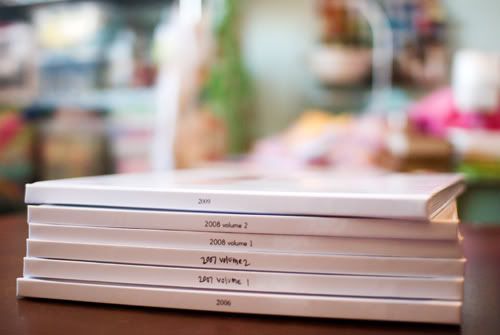
So for me, I blog to capture our story.  I hope to someday find the time to put each year I've blogged into books.  I have one down and many more to go.  It's my journal, diary, family history and life story.  Someday my grandkids will be reading this and thinking "Grandma was fun!"  Let's hope anyway♥

I hope those that do continue to read enjoy our story.  It might not be exciting, glamorous or worthy of your time but it's our story and I will continue to write about it so I can remember it when I'm old and gray.

Love, Cara


Monday, May 16, 2011

I Did It!

I've been working on my 40 before 40 list and one of the things was make a blog book.  Man I didn't want to do that.  Well, I do want to but I have tried before and it was such a pain.  I loaded my whole blog onto Blurb at once and it shut the whole site down.  Ooops.  That's when I said forget it! (this was a couple of years ago)

Yesterday I thought..."Hey, I think I will try again.  It can't be that bad?"

So I checked Blog2Print and Blurb and Blurb seemed to be a bit cheaper.  I loaded my first year of blogging only (2007) and it said it was going to be 267 pages.  Eeek! 

No time like the present so I dived right in and started editing, rearranging, adding pictures, deleting dumb posts and I have to be honest, it was easier than I thought it would be.  I turned my laser-like focus on and didn't let anything distract me.  I would work and look at the clock and 2 hours had passed WHOOSH! It didn't even seem like I had been sitting here in front of my computer for 9 HOURS!!!  Yep, I sat here until 2am last night.  Man my hips hurt when I finally stood up.  But it was worth it.  Today I finished up the last little editing and I am now BOOM - DONE with my first blog book!  I'm so proud of myself.  I do need to figure out what I am going to do with the cover.  I'm not sure yet.  I need some examples or something.  I like simple, semi-plain.  I'll have to do a little searching and see what I come up with.

I am now very motivated to get the rest of my blog into books. (four more years worth)  And because I've done it I can make books for the girls birthday parties, our family vacations, each of the girls.  I think I am having a creative breakthrough people!  Watch out......I could go crazy over here.

If you want to make a blog book BLURB is having a 20% off sale when you use code - NEWBLURB  you have to use it by May 31st so get going....it's fun!

When I was making my book I thought how I wanted to run over to my Mom's and show it to her as soon as I get it.  Since she's not here the second best person to show it to would be my Aunt Janet.  So watch for me Auntie, I'll be coming over soon!

Saturday, March 5, 2011

To Do:

One of the things on my 40 before 40 list is take my blog and turn it into a book. 
I've been meaning to for years....5 to be exact and this year I am going to do it.
I read this blog ( really quite lucky) which is darling BTW - and she just motivated me to make mine THIS month!  Yep, I'm going to work really hard and try to get at least the first year done. 


Is that not inspiration?  It is for me!  Go to her blog and see her beautiful pictures of her blog...in..a..book!

questions:
have you made a blog book?
what's your favorite blog-book company?
would you do it all in photoshop or use the given template?

Saturday, June 21, 2008

Blogging Class Part 2

Here are two things that I forgot to mention about leaving comments on others blogs and some other blogging tips and tricks:


1. The 1st thing you should do right now (if you haven't already) is go into CUSTOMIZE (up there in the top right hand corner of your blog) and then click SETTINGS, Then click COMMENTS scroll down 3/4 down and click YES on SHOW COMMENTS IN A POP UP WINDOW. By doing this when someone leaves you a comment and wants to go back to your blog it will only be 1 click on the X instead of 3 clicks trying to get back. Believe me when I tell you....This Is A MUST!

2. While you are there on this comments page you can also decide whether you want to have the word verification when someone leaves a comment. Totally up to you - however it IS an extra step for the commenter and might deter them from leaving a comment. Your choice though. (I do not have word verification-so you now know my personal feelings on this subject Ü)

NEXT

3. Stay right there on the SETTINGS / COMMENTS page and scroll all the way to the bottom where it says COMMENT NOTIFICATION EMAIL. This is where you need to put in your e-mail for two reasons:
1. By having your e-mail listed every time someone comments on ANY of your blog posts whether it be today's or 3 months ago you will get an e-mail with the comment left. Brilliant isn't it? No more checking all those posts to see if you have gotten any new comments.
2. Having your e-mail listed is very helpful when you receive said e-mail comments because if you want to respond back to the person leaving you the comment all you have to do is hit REPLY on your e-mail and you can answer back just to them and you know for sure they got it! I did have a question about what to do if you don't want to have your regular e-mail out there for the world to see and here is my answer - I haven't had an issues with it but if you still feel uneasy about it set up a free g-mail, yahoo, or hotmail account just for your blog.

NEXT

4. Now go back up to the top and click on EMAIL which is still in the SETTINGS TAB but over to the right. Do you see where it says BlogSendAddress? This is where you can add e-mails of friends and family who might want to be sent an e-mail whenever you update your blog. This is handy if your husband is gone a lot and he likes to read the blog to catch up on the things he has missed.

NEXT

5. Make sure your blog title link is on your profile. This is important (even if you have a private blog) so when you leave a comment - the person can click on your name and be directed to your blog. I have gotten comments from people but then don't know who they are because I can't link back. You can do this by going into DASHBOARD then click on EDIT MY PROFILE then click on SHOW MY BLOGS. If you have more than one you can choose them all or only one it's up to you. (I have two but my book club blog is private so I don't show it).

6. Lastly someone wanted to know how to do the smiley faces (Paige was that you?) so here you go it's very simple: 1st make sure you have your number lock on. 2nd hit ALT and 666 at the same time and you have this Ü Hit ALT and 3 once and you have this ♥ Hit ALT and 1 once and you have this ☺ ALT and 2 = ☻. I think you may be getting the hang of this, go to town! I went from 1-30 and this is what I got: ☺☻♥♦♣♠•◘○◙♂♀♪♫☼►◄↕‼¶§▬↨↑↓→←∟↔▲
Now I must tell you I cannot do this on my laptop for some reason. It has to be on my regular key board and I'm not sure about a MAC because I don't have one of those.

7. This is what I told my class the other night. I am NOT a blogging pro. I have learned most things by figuring it out or asking someone. I have done this by sheer patience and determination so don't give up! We bloggers are all one big happy family and would love to help each other in any way possible! I also wanted to thank everyone for their comments! I found some new blogging friends and heard from some old blogging friends and it was great!

Friday, June 20, 2008

Blogging Class 101

Last night I taught a little Blogging class here at the house for the girls at church (Enrichment Night). We started about 7:30 and went untill 10. There were a lot of questions and hopefully most of them got answered. Tiffany helped out and we put together a handout for the class so I thought I would post it for those who might be interested or who couldn't come.

One thing I found out was that A LOT OF PEOPLE READ MY BLOG BUT DON'T LEAVE A COMMENT!!!!! If you are a lurker....don't be afraid. I welcome comments and have met a lot of fun people and learned from those friends through blogging. I would be very sad if they had stayed lurkers because now they are my friends!!! So please, please make yourself known and comment!! ÜÜÜ

O.K. here is the handout. If you have an questions or great ideas that I don't have on this list leave a comment or e-mail me and I will add it to the handout. Thanks!

Blogging 101

What is a blog? According to Wikipedia, a blog (an abridgment of the term web log) is a website, usually maintained by an individual, with regular entries of commentary, descriptions of events, or other material such as graphics or video. Entries are commonly displayed in reverse chronological order. "Blog" can also be used as a verb, meaning to maintain or add content to a blog.
Many blogs provide commentary or news on a particular subject; others function as more personal
online diaries. A typical blog combines text, images, and links to other blogs, web pages, and other media related to its topic. The ability for readers to leave comments in an interactive format is an important part of many blogs. Most blogs are primarily textual, although some focus on art (artlog), photographs (photoblog), sketchblog, videos (vlog), music (MP3 blog), audio (podcasting) are part of a wider network of social media.


The world (and our ward) has gone “blog crazy”. Why is everyone so excited? What are the benefits of blogging?
1. It’s a fun way to stay connected with extended family, old friends………all those people on your x-mas list that you in the past you would hear from once a year. You can all stay up-to-date on what’s going on in a more day to day way in each others lives.
2. It’s a fun way to keep a journal and do your family history.
3. It’s a fun (and much MUCH easier way!) to do your scrapbooking or keep up with your family photos.
4. Because of the fun, social twist blogging puts on journaling or scrapbooking, it becomes easier to keep the happenings of your life up–to-date.
5. You can print it out as your family photo journal. (Or even one copy for each of your kids!) http://www.blurb.com/book/blogbook
6. You get all the same benefits of journaling- you tend to start thinking of life in a slightly different way. You’re more aware of “moments” and things you want to remember and you end up capturing more of the moments before they slip away.
7. You get to look at other people’s blogs- you can get SO MANY, MANY, MANY good ideas from other wonderful mothers to help you in your life!!
8. You realize that you’re not the only one out there that might be struggling with something- you see other people in a slightly more “real” light, and as you become more “real” in your own posts, other people’s comments help you realize that some of our experiences are more common than we think. It’s very therapeutic!
9. Lets you stay more up-to-date with technology and computer skills.
10. It’s a fun hobby.
11. Getting comments on your posts is fun!!!

12. Your Husband can get a glimpse into what goes on in the family when he’s not around

Ideas, Tips and Techniques

8 Ways to Bling Up Your Blog
1. http://www.bloggerbuster.com/
2. http://www.thecutestblogontheblock.com/
3. http://www.pyzam.com/
4. http://www.cottagearts.net/tutorials.html
5. http://bloggerfordummies.blogspot.com/
6. http://www.theshabbyshoppe.com/
7. http://www.shabbymissjenndesigns.com/shoppe09f02ecf5121ee2d3124270536d47
8. http://smjtutorials.blogspot.com/
9. http://www.scrap-e-blog.blogspot.com/


Blog About This:
Memory Monday - write about a memory
Menu Plan Monday – post what you’re having for dinner that week and the recipe to share with others and to save for yourself.
Tuesday Tell All – let it all out!
Top 10 Tuesday – list your Top 10 favorites that week
Wordless Wednesday – post a picture only
Just For Fun Friday – be creative
Five on Friday – another way to list things
Sunday Thoughts
52 Blessings Project
Journal Ideas - 258 of them!
( http://homepage.mac.com/mseffie/handouts/258journal.html)

Header How To

A header is the top picture on a person’s blog. It’s not complicated to make or install. Here’s how:
1. Find a picture you like and crop it so it is apx. 700x300 (mine is 780x341) You can always right click on a person’s header that you like –- go to properties and it will give you the exact dimensions.
2. This is where you can add words or digital scrapbook elements to your picture (with your photoshop program of choice) which will be you blog header (title page).
3. Go to CUSTOMIZE on your blog
4. Click on the EDIT that says HEADER
5. Click on BROUSE to find said picture. Upload said picture.
6. Make sure you click on the dot that says Placement-instead of title and description.
7. TAH-DAH! You have a cute header!

Blogging Safety

1. Never offer any personal information including your last name, contact information, home address, phone numbers, school's name, e-mail address, last names of friends or relatives, instant messaging names, age, or birth date.
2. Decide up front how much personal information you will share on your blog
3. Consider the way you are perceived online
4. Assume what you publish on the Web is permanent. Anyone on the Internet can easily print out a blog or save it to a computer.
5. Use blogging provider sites with clearly stated terms of use, and make sure they can protect the actual blogs, not just the user accounts, with password protection. (Even so, it's better to assume anyone can see it.)
6. Avoid trying to "outdo" or compete with other bloggers. Remember this is for fun!
7. Keep blogs positive and don't use them for slander or to attack others.
8. Ask yourself (and instruct your kids to do the same) if you are you comfortable showing any of the content to a stranger. If in doubt, take it out.
9. Keep your reoccuring events private (swimming lessons @ the same time, park days, etc.) also don't let on that your husband will be out of town or gone!!!

Google is your conscience, and it keeps a record of every single word your write on the Internet. Do you really want this to be archived forever? Watch what you say about your family or events, friends and kids. It will probaly be out there for all to read in the forever future!

Adding Your Name to Your Blog Posts:
http://momswhoblog.blogspot.com/search?q=adding+a+signature

Don’t forget to Google your How to Questions. I did and I got a lot of great sites that had helpful information. Here are a couple:
1. http://tips-for-new-bloggers.blogspot.com/2007/02/background-image-for-blogger-header.html
2. http://www.momswhoblog.blogspot.com/ This is my favorite how to site. I wish they would update it more. I read this whole blog and found a lot of helpful information...

Html Codes for Font Colors:
1. http://www.computerhope.com/htmcolor.htm
2. http://html-color-codes.com/
3. http://html-color-codes.info/#Html_Color_Code_Chart

Fun and FREE Font’s For Your Computer!!
1. http://www.kevinandamanda.com/scrapbook/fonts/fontsforpeas/
This site has a TON of the cutest fonts for your computer for FREE! They will even make a font in your own handwriting! I love this site!

Blogging Etiquette's Top Ten:
1. Give credit where credit is due.
2. Punctuate and capitalize (use that spell check!).
3. Leave a comment or a shout out if you visit a blog.
4. Don't confuse thy opinion with truth.
5. Refer to someone’s post with a link.
6. Make it possible to link back to your blog if you leave a comment.
7. Tell the whole truth and nothing but the truth.
8. Keep it short and sweet (mostly).
9. Remember to have fun with your blog – it’s who you are!
10. Remember to love thy neighbor as thyself this means be nice!

Friday, January 5, 2007

Blogging 101 Links

Here are some blogs that have a ton of helpful information to get your blog up and running, fine tuned or just looking pretty as pie!  I am so thankful to have had the help of fellow bloggers over the years that have answered my questions and helped me navigate through the crazy world of HTML.  Good luck and here's hoping some of this information will be helpful!

Gardenview Cottage - Blogging 101, 102 and More Blogging Tips  (a little class I taught)

Delightful Dwelling - How to add tabs in blogger

Funky Junk - Blogging Tips from A to Z

Tricks for New Bloggers - Blogger FAQ and Helps


Clover Lane - How to Make a Blog Banner in Picasa

Between Naps on the Porch - Blogging Secrets Shhhhhh

Blogger for Dummies - Tips, Tabs and Layouts

Live Writer - my personal fav

Link Within - if you want the pictures at the end of your post linking up past posts

Dummies.com - Writing a Good Blog 

Crazy Mama - Picture Safety

You Tube - How to add a You Tube video

More Blogging Tips

How To Create a Flavicon on Blogger


Ever wonder how people get the cute little square icons up in the address bar and on the tabs of Internet Explorer? Those cute little pics are called Favicons and it's easy to do your own! (quote from Oikology)


I found the Oikology blog thru Mom of 3 Crazy Kids (thanks♥) and she gives detailed instructions on how to add a cute little logo to your blog. I thought I would post the link in case anyone wanted to try it out! Good Luck♥